Vetted by NeuralPress's Multi-Agent Verifier for strict factual validity and event relevance. Our compliance engine cross-checks and filters search results to ensure zero false correlations or misleading content.
Threat Vector Analysis
Primary methods used by ClickFix to compromise systems
Primary Sources
New ClickFix Attack Targets macOS Users With Fake Disk Cleanup and ...
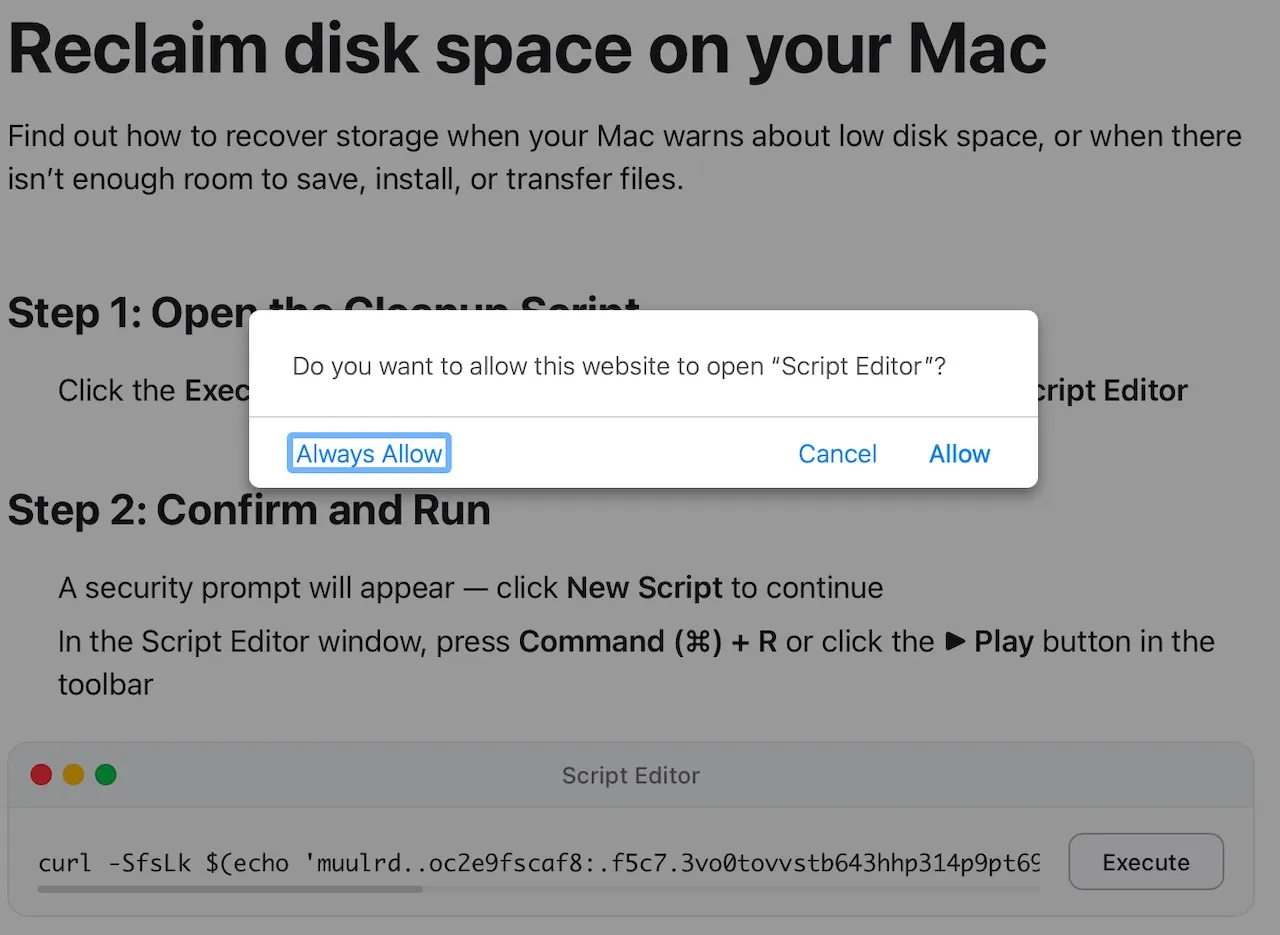
A new wave of cyberattacks is putting macOS users in the crosshairs, and this time the bait looks almost too familiar. Attackers are disguising their malware as helpful disk cleanup tools and system utilities, tricking people into running dangerous commands directly on their own computers. The campaign, known as ClickFix, works by placing fake troubleshooting posts on trusted platforms like Medium and Craft. These posts promise to solve common macOS problems, such as running out of disk space, but they instruct users to open Terminal and paste in a command. Once that command runs, it quietly downloads and executes an infostealer in the background, without the user ever realizing what happened. Microsoft researchers identified this threat and have been closely tracking its evolution since at least January 2026. They observed three distinct campaign types, all sharing the same core goal: steal sensitive data, maintain persistent access to infected systems, and exfiltrate everything from saved passwords and browser credentials to cryptocurrency wallet keys and iCloud data. What makes this campaign especially dangerous is how it bypasses Apple’s built-in security checks. Normally, macOS uses a verification process called Gatekeeper to review applications before they run. ClickFix instruction hosted on macclean[.]craft[.]me (Source – Microsoft) But when a command is pasted directly into Terminal, that review process does not apply at all, giving attackers a clean and reliable path onto the device with minimal friction or resistance. The stolen data is extensive and deeply personal. Depending on which campaign version infects the system, attackers can walk away with iCloud data, saved browser passwords, Keychain entries, media files, Telegram data, and cryptocurrency wallet information. Reconnaissance loader with AppleScript payload delivery (Source – Microsoft) In some cases, the malware goes further by replacing legitimate crypto wallet apps like Trezor Suite, Ledger Live, and Exodus with fake, attacker-controlled versions designed to silently intercept every future transaction. How the Fake Utility Lures Work The lures in this campaign are carefully crafted to look like genuine help content. Fake blog posts on Medium mimicked legitimate macOS support guides, with sites like macos-disk-space[.]medium[.]com telling users to paste a command to “fix” their storage issue. Similar pages appeared on Craft, a popular note-taking platform, and on standalone...
ClickFix Malware (Mac) - Removal steps, and macOS cleanup (updated)
What is "ClickFix" malware? ClickFix scams trick users into running malicious commands by pretending to solve issues like fixing website errors or performing other steps. Ultimately, victims are tricked into taking actions that cause computer infections. These scams can lead to various issues, including data theft and unauthorized remote access to computers. ClickFix campaign targeting macOS users One known scam campaign targeting macOS users is the fake Safeguard scam, which primarily targets cryptocurrency users. The scam operates in at least two ways. In the first case, users may come across Telegram channels urging them to "Tap to verify" to participate in token airdrops. Clicking the provided button or link directs users to a fake Safeguard bot that pretends to verify their account. After the "verification" process, the bot claims that the verification has failed and provides manual steps to resolve the issue. If these steps are followed, malicious code is secretly copied to the clipboard. In the second case, scammers use fake social media accounts impersonating well-known people and share links to Telegram groups in comment sections. They invite users to join for investment opportunities. Once users join these groups, they are tricked into following a fake verification process, similar to the first scenario. When users are given step-by-step instructions, harmful code is copied to their clipboard. If they paste this code into the macOS Terminal or another system tool, it may appear normal, sometimes starting with a benign-looking term like "Telegram" masking its malicious intent. The code typically contains commands that download and run advanced malware, such as remote access Trojans. These RATs allow hackers to steal sensitive information, such as wallet files, passwords, and private keys, and can even be used to steal cryptocurrency. It is important to mention that above are just a couple examples of schemes used to trick users into infecting computers. Threat actors can also try to trick users into "fixing" problems, "creating" documents, "joining" calls, and taking other steps to lure users into unknowingly executing malware through malicious code pasted into their clipboard. Threat Summary: Name ClickFix malicious campaign Threat Type Malware Detection Names (Malicious file) Avast (MacOS:AMOS-BK [Trj]), AVG (MacOS:AMOS-BK [Trj]), ESET-NOD32 (A Variant Of OSX/PSW.Agent.CZ), Kaspersky (HEUR:Trojan-PSW.OSX.Amos.ah), Full List Of Detections (Vi...
Fake macOS Troubleshooting Sites Used to Steal iCloud Data in ClickFix Scam
Microsoft researchers warn of a new ClickFix campaign targeting macOS with fake guides on Medium and Craft to deploy AMOS and SHub Stealer via Terminal commands.
The 'Fix' Is the Exploit: ClickFix, FileFix, JackFix and Pastejacking ...
The 'Fix' Is the Exploit: ClickFix, FileFix, JackFix and Pastejacking Attacks Explained ClickFix attacks trick users into running malicious code disguised as legitimate troubleshooting. Learn how these social engineering tactics work and how to defend against them.